Hardware-isolate,

Back to Blog
Tutorial
Jul 28, 2026
5 min read

How to Deploy and Run Hermes on a GPU Slice

Deploy Nous Research's 405B-parameter Hermes 3 model efficiently using a 48GB GPU slice and FP8 quantization.

hermes-gpu-slice
Hermes 3 is Nous Research's 405B-parameter language model — one of the most capable open-weight LLMs available. It's also enormous: the full model requires over 200GB of VRAM, which means you need at least three H100s or four A100s to load it without quantization.
Unless you use a GPU slice.
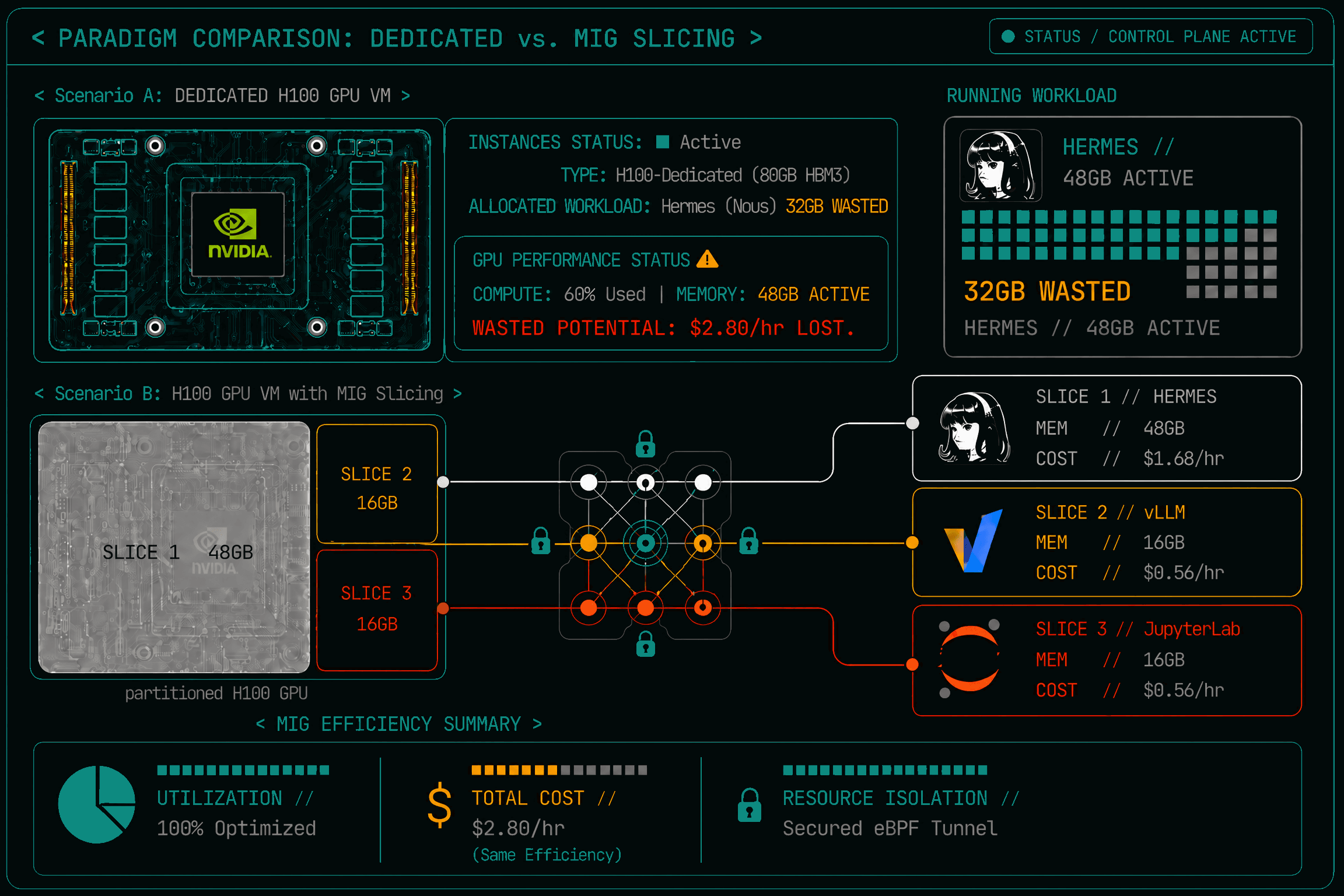
GPU slicing lets you run large models on a fraction of a GPU by sharing the remaining capacity with other workloads. Instead of paying for an entire H100 (80GB) that you only half-use, you pay for a 48GB slice — exactly what Hermes needs in 4-bit quantization. Here's how to deploy it on Istidlal in under five minutes.
gpu slicing

GPU Allocation Comparison

What You'll Need

  • An Istidlal account with GPU access
  • The Hermes 3 model (automatically downloaded on first run)
  • About 48GB of VRAM (one H100 slice or equivalent)

Step 1: Create a GPU Slice Function

From the dashboard, create a new function with these settings:
yaml
1# Function: hermes-3
2containerImage: vllm/vllm-openai:v0.22.1
3inferencePort: 8000
4gpu:
5  mode: shim
6  framework: vllm
7  multiplexing: 1        # exclusive slice
8resources:
9  requests: { cpu: "2", memory: 8Gi }
10  limits:   { cpu: "4", memory: 16Gi }
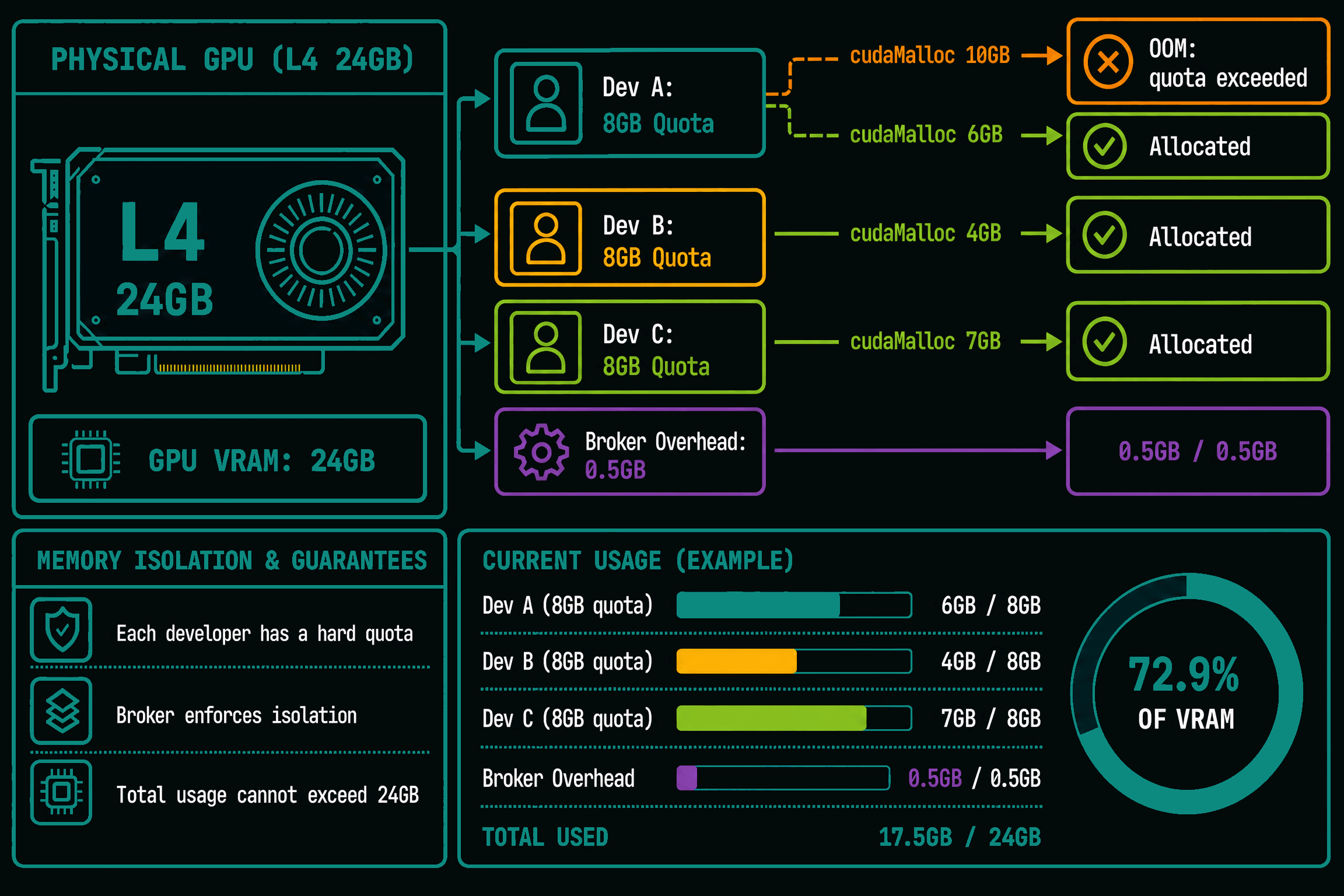
The mode: shim tells the platform to use GPU virtualization instead of dedicated hardware. Your function shares the physical GPU with other workloads, but the broker enforces VRAM quotas and CUDA isolation — your model can't see or interfere with other tenants.

Step 2: Configure the Model

Add the model arguments:
yaml
1args:
2  - "--model"
3  - "NousResearch/Hermes-3-Llama-3.1-405B"
4  - "--max-model-len"
5  - "8192"
6  - "--gpu-memory-utilization"
7  - "0.95"
8  - "--tensor-parallel-size"
9  - "1"
10  - "--quantization"
11  - "fp8"
The fp8 quantization reduces VRAM usage from ~200GB to ~50GB, fitting comfortably in a 48GB slice. The max-model-len of 8192 gives you decent context length without exhausting KV cache space.

Step 3: Deploy

Click Deploy. Behind the scenes, the platform:
gpu-workflow
  1. Provisions a GPU slice on an available node
  2. Pulls the vLLM container image (cached after first deploy)
  3. Downloads the Hermes 3 weights from Hugging Face (cached on subsequent deploys)
  4. Starts vLLM, loads the model into VRAM
  5. Registers the function endpoint
First deploy takes 3-5 minutes (mostly model download). Subsequent deploys with the same model take under 30 seconds.

Step 4: Chat with Your Model

Once the function is Running, you get an endpoint:
awk
1[https://hermes-3.invoke.istidlal.ai/](https://hermes-3.invoke.istidlal.ai/)

Via the browser

Open that URL. You'll be prompted to sign in with Google. After authentication, the vLLM chat interface loads automatically.

Via the API

Mint an API key from the dashboard, then:
shell
1curl -X POST [https://invoke.istidlal.ai/v1/hermes-3/v1/chat/completions](https://invoke.istidlal.ai/v1/hermes-3/v1/chat/completions) \\
2  -H "Authorization: Bearer $ISTIDLAL_API_KEY" \\
3  -H "Content-Type: application/json" \\
4  -d '{
5    "model": "NousResearch/Hermes-3-Llama-3.1-405B",
6    "messages": [
7      {"role": "system", "content": "You are Hermes 3, a helpful AI assistant."},
8      {"role": "user", "content": "Explain quantum entanglement to a 12-year-old."}
9    ],
10    "max_tokens": 500,
11    "temperature": 0.7
12  }'

From Python

python
1from openai import OpenAI
2
3client = OpenAI(
4    base_url="[https://invoke.istidlal.ai/v1/hermes-3/v1](https://invoke.istidlal.ai/v1/hermes-3/v1)",
5    api_key="isi_xxxx:yyyyyyyyyyyyyyy"
6)
7
8completion = client.chat.completions.create(
9    model="NousResearch/Hermes-3-Llama-3.1-405B",
10    messages=[{"role": "user", "content": "Write a haiku about GPU servers."}],
11)
12print(completion.choices[0].message.content)

What's Happening Under the Hood

Your function runs on a GPU slice — a fraction of a physical GPU isolated by our broker. The broker intercepts every CUDA call through LD_PRELOAD libraries, forwards it to the real GPU, and enforces per-tenant VRAM limits. Your function sees exactly 48GB of GPU memory, even though the physical H100 has 80GB — the remaining 32GB is allocated to other tenants running on the same GPU.
This means:
  • You pay for what you use, not for the whole GPU
  • Multiple models can share one H100 without MIG hardware partitioning
  • GPU utilization stays high — the broker fills idle capacity with other workloads
  • Isolation is enforced — your VRAM quota is hard, not advisory

Cost Comparison

ùmonthly-gpu-cpst

GPU Cost Dashboard

ConfigurationMonthly Cost (approx)
Dedicated H100 (80GB)$2,800
GPU slice, 48GB$1,680
GPU slice, 24GB$840
GPU slice, auto-scale (0-10 replicas)Pay per second of actual use
The auto-scale option costs nothing when idle. If Hermes serves 100 requests per day averaging 2 seconds each, you pay for roughly 3.3 GPU-minutes per day — about $3/month.

Next Steps

Once Hermes is running, you can:
  • Add more replicas for higher throughput: set scale.replicas: 3
  • Enable streaming for real-time token output: add streaming.enabled: true
  • Set up auto-scaling: add min-replicas: 0, max-replicas: 5 and the platform handles the rest
  • Fine-tune Hermes on your own data (see our fine-tuning guide)
Infrastructure Platform

Scale
Without
Limits.

Deploy serverless endpoints, agents, and containerized applications on Istidlal's hardware-isolated fractional GPUs.