Hardware-isolate,

Back to Blog
Tutorial
Aug 3, 2026
2 min read

Run your Local Jupyter Notebooks on ANY remote GPU directly from VSCode

Eliminate the tedious setup and constant context switching required to run Jupyter notebooks on remote GPUs directly from VSCode using Istidlal extension

Run your Local Jupyter Notebooks on ANY remote GPU directly from VSCode Banner
Running a Jupyter notebook on a remote GPU is usually a tedious chore. Every time you want to start working, you open an SSH tunnel, install and configure JupyterLab if it's a new machine, switch to a browser tab to actually write code, and keep a separate terminal open just to watch nvidia-smi. None of it is hard. All of it is annoying.
So we asked ourselves why we couldn't just do this directly from VSCode, the editor we already had open anyway.
We built the Istidlal VSCode extension to answer that question. It eliminates the manual setup and lets you run notebooks on remote GPUs entirely from your local editor.

Istidlal VSCode Extension Setup Part 1

How does the infrastructure setup work?
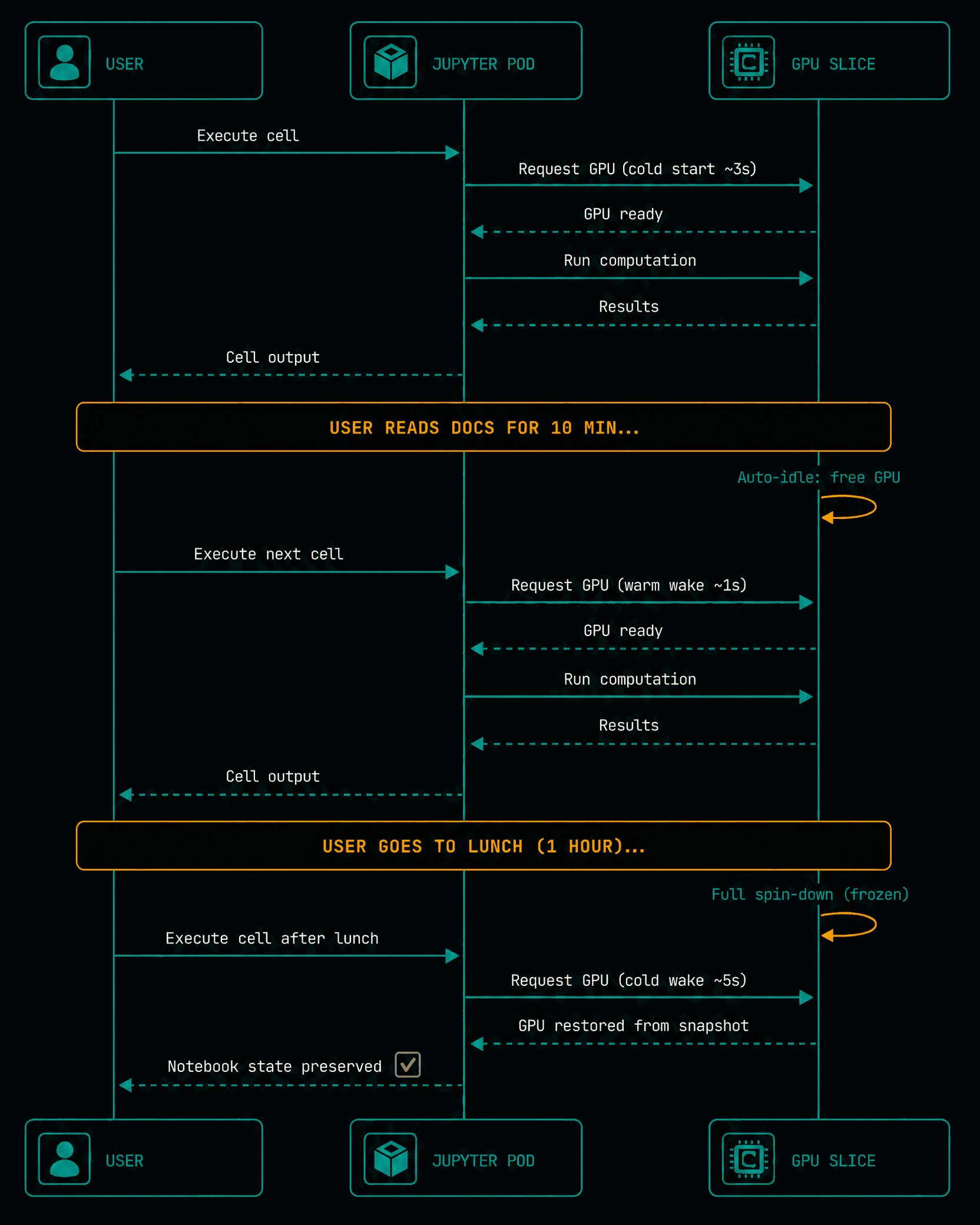
Bringing a server online shouldn't require managing dependencies by hand. We designed the workflow so the platform handles the heavy lifting.
You start by clicking the Bring Server button in the Istidlal dashboard. This generates an onboarding command that you run on your remote machine, securely adding it to the Istidlal mesh. From there, you install the Istidlal Extension addon directly from the dashboard. Installing this addon automatically triggers the installation of the JupyterLab server as a dependency, which frees you from the manual setup. If your machine has a GPU, you can also install the GPU Stats addon to scrape utilization metrics with one click.
Figure 1: Istidlal VSCode Extension & JupyterLab Remote Infrastructure Setup Architecture

Figure 1: Istidlal VSCode Extension & JupyterLab Remote Infrastructure Setup Architecture

Istidlal VSCode Extension Setup Part 2

What does the workflow look like in practice?
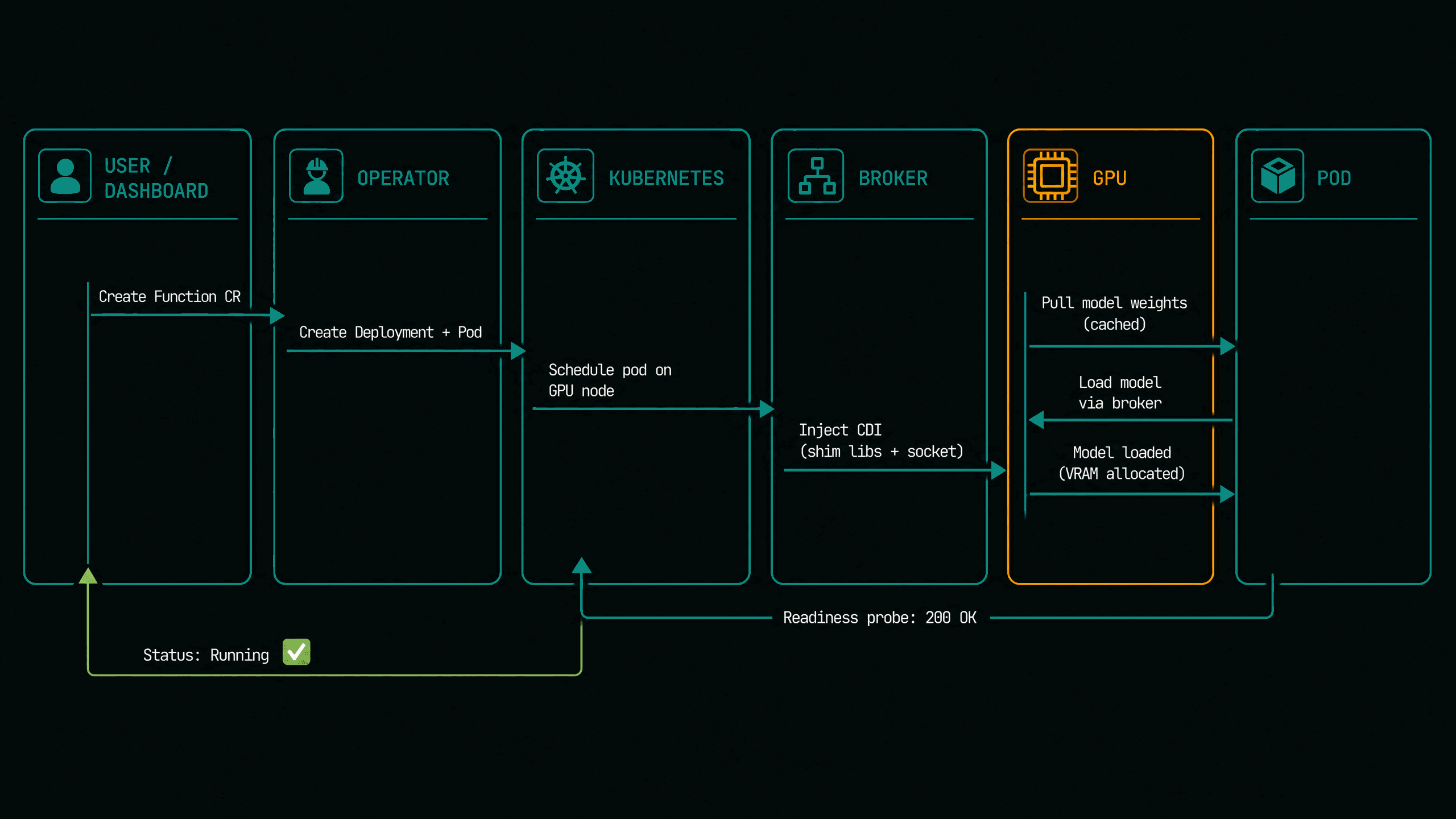
To demonstrate how this workflow works in action, we ran a demo on a Scaleway GPU VM to fine-tune a small model that translates English sentences into a Yoda-like speaking style.
Once the VM joined our mesh and the addons were installed, the dashboard provided a secure SSH URL. We opened our local VSCode instance in the project directory, clicked the Istidlal extension, and provided that URL along with our SSH key. After connecting, we simply opened our Jupyter notebook, selected the remote Istidlal kernel, and started running cells. We tracked the remote GPU utilization in the VSCode panel simultaneously.
The entire process happened inside one window. There was no browser tab, no manual port forwarding, and no context switching. We wrote the code in our IDE and executed it on remote hardware without ever leaving the editor.
Figure 2: End-to-End Development Workflow from Local VSCode to Remote GPU Slice

Figure 2: End-to-End Development Workflow from Local VSCode to Remote GPU Slice

Infrastructure Platform

Scale
Without
Limits.

Deploy serverless endpoints, agents, and containerized applications on Istidlal's hardware-isolated fractional GPUs.