You don't need 8 H100s to fine-tune a language model. With parameter-efficient techniques like LoRA and QLoRA, you can fine-tune a 7B-parameter model on a single 24GB GPU slice — the kind that costs about $0.50/hour instead of $12/hour for a dedicated GPU.
This guide walks you through fine-tuning Llama 3.1 8B on your own dataset using QLoRA, deployed on Istidlal's GPU slices. You'll have a custom model running in under an hour, including training time.
Why Fine-Tune on a Slice?
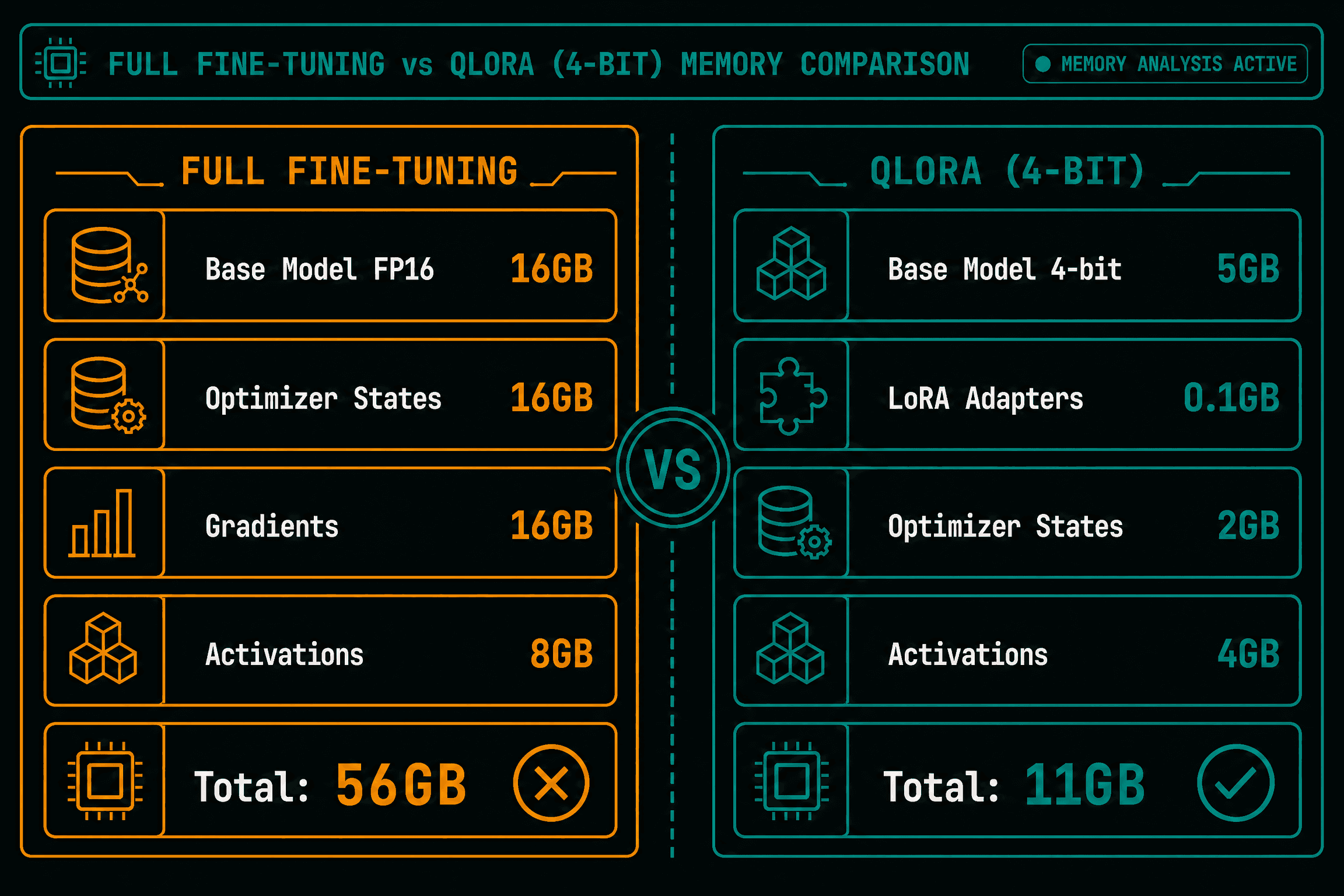
Full fine-tuning updates every parameter in the model. For an 8B-parameter model in FP16, that's 16GB just for the weights, plus 16GB for optimizer states — you need at least 40GB of VRAM, which means a dedicated A100 or H100.
LoRA (Low-Rank Adaptation) freezes the base model and trains small adapter matrices instead. QLoRA goes further — it quantizes the base model to 4 bits, cutting VRAM usage by 4x. The result: you can fine-tune an 8B model on a 24GB slice.
Figure 1: VRAM Memory Footprint: Full Fine-Tuning vs LoRA vs QLoRA on 8B Models
Step 1: Prepare Your Dataset
We'll use the Alpaca instruction-tuning dataset as an example. Your data should be in a JSONL file with instruction, input, and output fields:
{"instruction": "Convert this sentence to passive voice", "input": "The cat ate the mouse.", "output": "The mouse was eaten by the cat."}
{"instruction": "Classify the sentiment", "input": "I loved every minute of this movie!", "output": "Positive"}
Upload your dataset to the platform's storage:
istidlal storage upload ./my-dataset.jsonl datasets/alpaca-custom/
Step 2: Create the Fine-Tuning Function
From the dashboard or CLI:
containerImage: winglian/axolotl:v0.5.0
inferencePort: 8000
gpu:
mode: shim
framework: generic
multiplexing: 2
resources:
limits: { memory: 32Gi }
args:
- "--config"
- "/workspace/config.yaml"
Axolotl is a popular fine-tuning framework that wraps Hugging Face's PEFT library. It handles LoRA/QLoRA configuration, dataset loading, and checkpoint saving.
Create a config.yaml:
base_model: meta-llama/Llama-3.1-8B
model_type: LlamaForCausalLM
tokenizer_type: AutoTokenizer
load_in_8bit: false
load_in_4bit: true
strict: false
datasets:
- path: /workspace/datasets/alpaca-custom/my-dataset.jsonl
type: alpaca
dataset_prepared_path: /workspace/last_run_prepared
output_dir: /workspace/output
sequence_len: 2048
sample_packing: true
pad_to_sequence_len: true
lora_r: 16
lora_alpha: 32
lora_dropout: 0.05
lora_target_modules:
- q_proj
- k_proj
- v_proj
- o_proj
- gate_proj
- up_proj
- down_proj
gradient_accumulation_steps: 4
micro_batch_size: 2
num_epochs: 3
optimizer: adamw_8bit
lr_scheduler: cosine
learning_rate: 0.0002
train_on_inputs: false
group_by_length: false
bf16: auto
fp16: false
wandb_project: my-finetune
wandb_watch: gradients
The key settings: load_in_4bit: true (QLoRA), lora_r: 16 (rank 16 adapters), micro_batch_size: 2 with gradient_accumulation_steps: 4 (effective batch size 8, fits in 24GB VRAM).
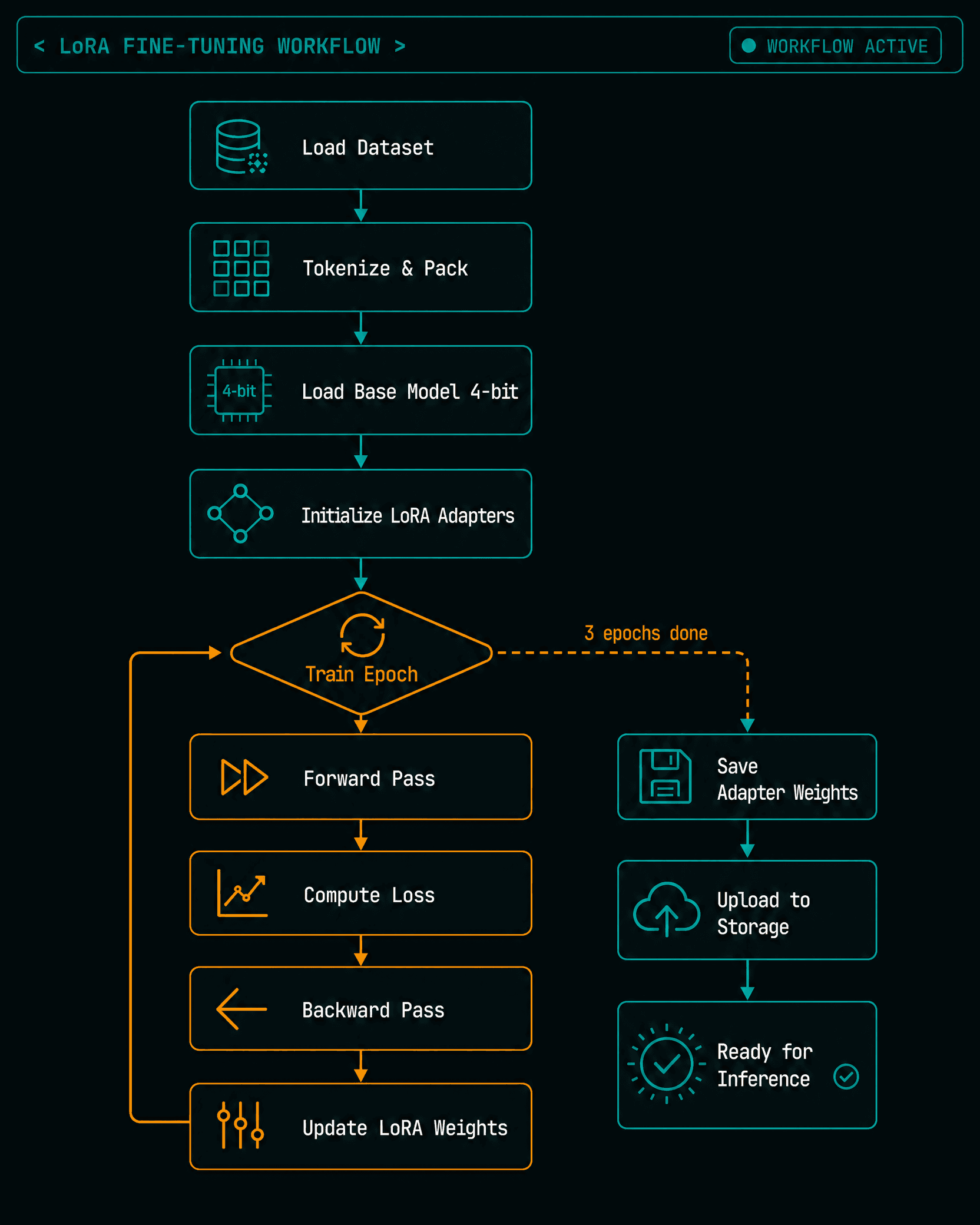
Figure 2: QLoRA Parameter-Efficient Fine-Tuning Workflow & Architecture
Step 4: Run Fine-Tuning
Deploy the function. Axolotl will:
Download the base model (cached on the platform)
Load it in 4-bit quantization (~5GB VRAM)
Initialize LoRA adapters (~100MB)
Process and tokenize the dataset
Train for 3 epochs
For a dataset of 1,000 examples with an effective batch size of 8, training takes about 20-30 minutes on a GPU slice. The output is a set of LoRA adapter weights (~50MB), not a full model checkpoint.
Step 5: Deploy Your Fine-Tuned Model
Your LoRA weights are saved to the platform's storage. To deploy the fine-tuned model:
containerImage: vllm/vllm-openai:v0.22.1
inferencePort: 8000
gpu:
mode: shim
framework: vllm
multiplexing: 1
args:
- "--model"
- "meta-llama/Llama-3.1-8B"
- "--lora-modules"
- "my-finetune=/workspace/output"
- "--max-lora-rank"
- "16"
vLLM can serve LoRA adapters natively — it loads the base model once and applies different adapters per request. This means you can serve multiple fine-tuned variants of the same base model on a single GPU slice.
Step 6: Test Your Model
curl -X POST https://invoke.istidlal.ai/v1/my-finetuned-llama/v1/chat/completions \
-H "Authorization: Bearer $ISTIDLAL_API_KEY" \
-H "Content-Type: application/json" \
-d '{
"model": "my-finetune",
"messages": [{"role": "user", "content": "Convert to passive: The dog chased the ball."}],
"max_tokens": 50
}'
The response should reflect your fine-tuned behavior. Our Alpaca-trained model now understands instruction-following tasks that the base Llama model would struggle with.
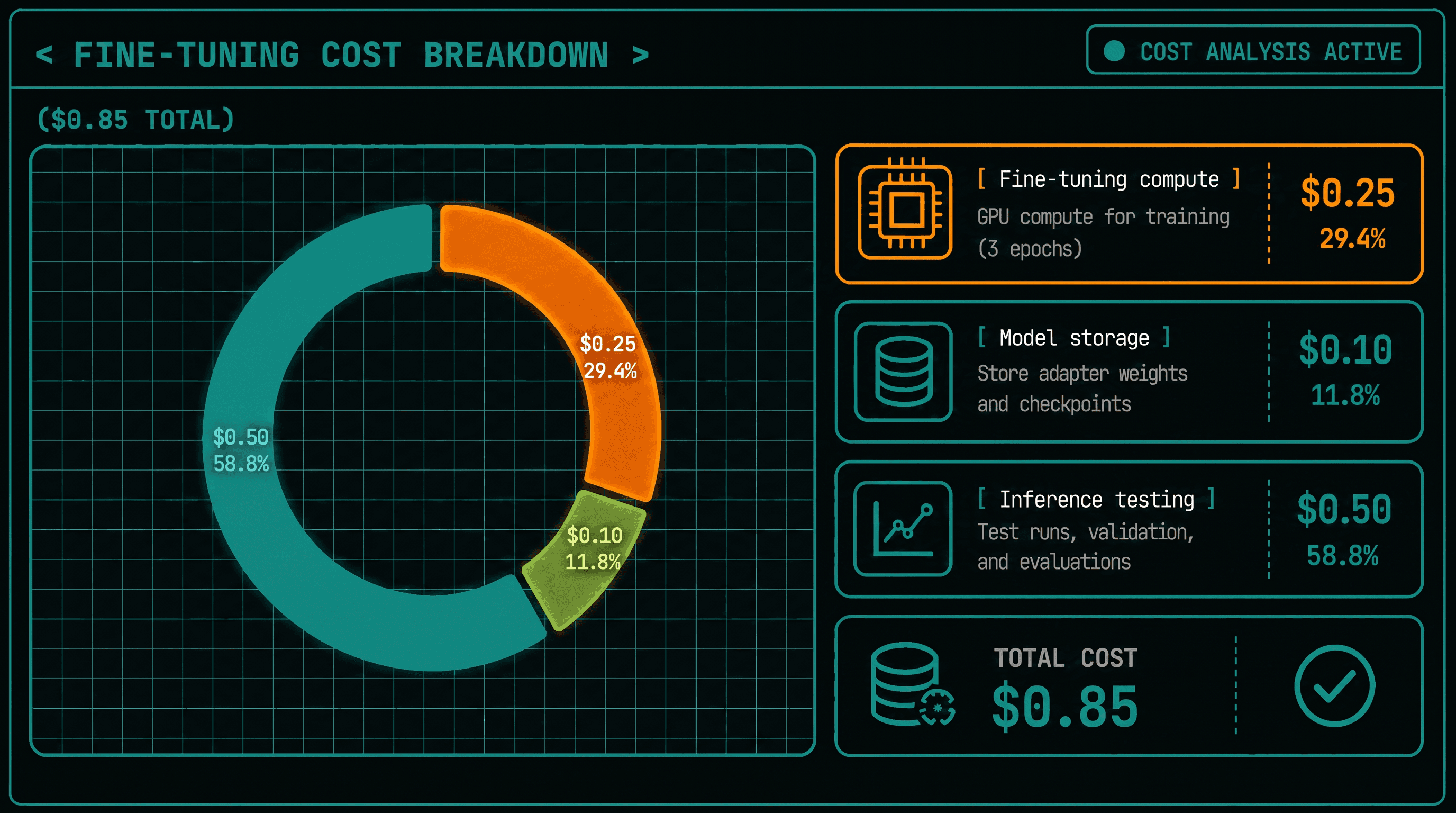
Cost Breakdown
| Step | GPU Hours | Slice Cost |
|---|
| Fine-tuning (1K examples, 3 epochs) | 0.5 | ~$0.25 |
| Deploying the fine-tuned model | Pay per second of inference | ~$0.50/hour active, $0 idle |
Total cost to go from base model to deployed fine-tuned endpoint: under $1.
Figure 3: Cost & Time Breakdown: Dedicated H100 Cluster vs Istidlal 24GB GPU Slice
What's Next
Iterate: Adjust your dataset, LoRA rank, or learning rate and fine-tune again. LoRA weights are small — you can store dozens of variants.
Evaluate: Use a held-out test set to measure your fine-tune's performance on your specific task.
Scale: Add more replicas if you need higher throughput. The base model is loaded once; additional replicas share the same cached weights.
Combine: Serve multiple LoRA adapters on the same base model. vLLM's LoRA support makes this efficient — you pay for one GPU slice, serve five fine-tuned models.